
AKatastr1.5.8.1 - Get APK
You'll be able to download in few seconds.
Publisher Description
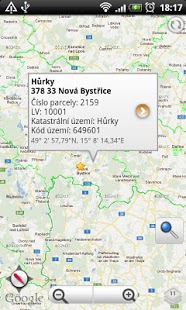
View Czech cadastral maps on Your Android™ phone. Just three steps to get record: open AKatastr, define point, tap on bubble window. You are done!
If you buy this app you will support us!
Category winner work, business, enterprise in competition Aplikace roku 2011.
If you have any probles, don't hesitate to contact me. Thank you!
Twitter @JiriProchazka
Functions:
Two step for show cadastral record (only in Czech).
Possibility to choose showed layers for cadastral map.
Optimalization for tiles, loading only for Czech Republic area.
Possibility to store tiles on SD card.
Share location and plot information.
Searching by address, plot number, ownership sheet and cadastral area.
Based on google maps.
Actual user position + compass.
Different location format.
Possibility to navigate to plot.
Invoke external navigation to defined point.
Favorite items.
Extended information in callout.
Restricted only for ČR.
Key word: Maps, Cadastral, Cadastral record, Cadastral map, WMS, CUZK.
Supported Android versions: Android 1.6 up to Android 5.1. Android 6 and upper i snot currently suppoterted.
About AKatastr
The company that develops AKatastr is CakeBakery.EU. The latest version released by its developer is 1.5.8.1.
To install AKatastr on your Android device, just click the green Continue To App button above to start the installation process. The app is listed on our website since 2017-03-14 and was downloaded 0 times. We have already checked if the download link is safe, however for your own protection we recommend that you scan the downloaded app with your antivirus. Your antivirus may detect the AKatastr as malware as malware if the download link to cz.jprochazka.katastr is broken.
How to install AKatastr on your Android device:
- Click on the Continue To App button on our website. This will redirect you to Google Play.
- Once the AKatastr is shown in the Google Play listing of your Android device, you can start its download and installation. Tap on the Install button located below the search bar and to the right of the app icon.
- A pop-up window with the permissions required by AKatastr will be shown. Click on Accept to continue the process.
- AKatastr will be downloaded onto your device, displaying a progress. Once the download completes, the installation will start and you'll get a notification after the installation is finished.
Program Details
System requirements
Download information
Pricing
Version History
version 1.5.8.1
posted on 2017-03-14
Fixed problem for HD devices map painting
Better performance for loading cadastral map
Android 4.4 Kitkat compatibility
version 1.1
posted on 2011-06-02
Several fixes and updates
Disclaimer
External Download
We do not host AKatastr on our servers. We did not scan it for viruses, adware, spyware or other type of malware. This app is hosted by Galad and passed their terms and conditions to be listed there. We recommend caution when installing it.
The APK Download link for AKatastr is provided to you by apps112.com without any warranties, representations or guarantees of any kind, so access it at your own risk.
If you have questions regarding this particular app contact the publisher directly. For questions about the functionalities of apps112.com contact us.
